In short: If you ship LLM features without evals, you’re guessing. Good evals need isolated prompts, representative test data, versioned runs, and output artifacts that make results debuggable.
You shipped an LLM-powered feature. Then someone edits the prompt, and now you do not know whether the change improved the results, made them worse, or left them unchanged. Before shipping that change, you should be able to measure its impact on the system.
This is the eval architecture I’ve used across five client LLM projects in production. It’s a practical hot-to that sits alongside the “8 standards for building production-ready features using LLMs” post and the “80 prompts zero evals” post.
This post covers evals for LLM classification and extraction prompts: tasks where the output has a verifiable right answer.
Summarization, generation, and conversational prompts need different evaluation approaches that I won’t cover here.
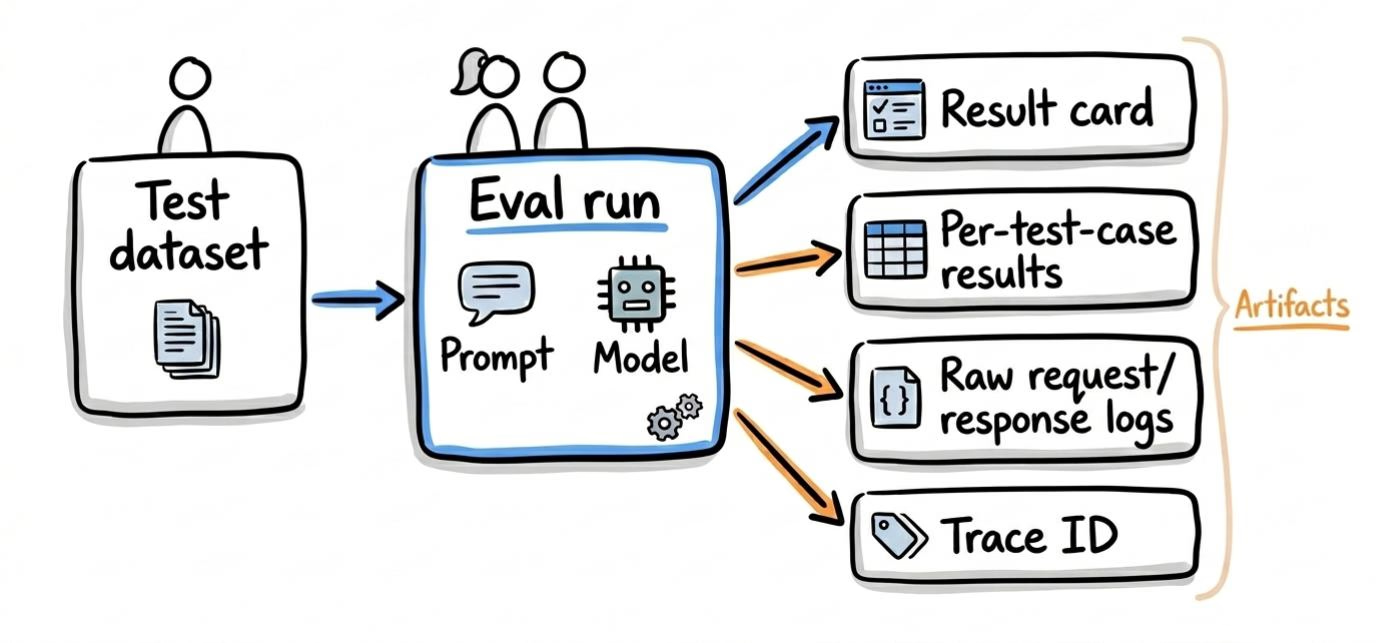
What an eval run actually produces
A single eval run should give you:
- A result card (execution timestamp, model used, prompt text or AI gateway prompt ID, input hash, accuracy breakdown)
- Per-test-case pass/fail with expected vs. actual
- Raw API request/response logs for debugging
- A trace ID that links the run to your observability platform or AI gateway
One eval per prompt
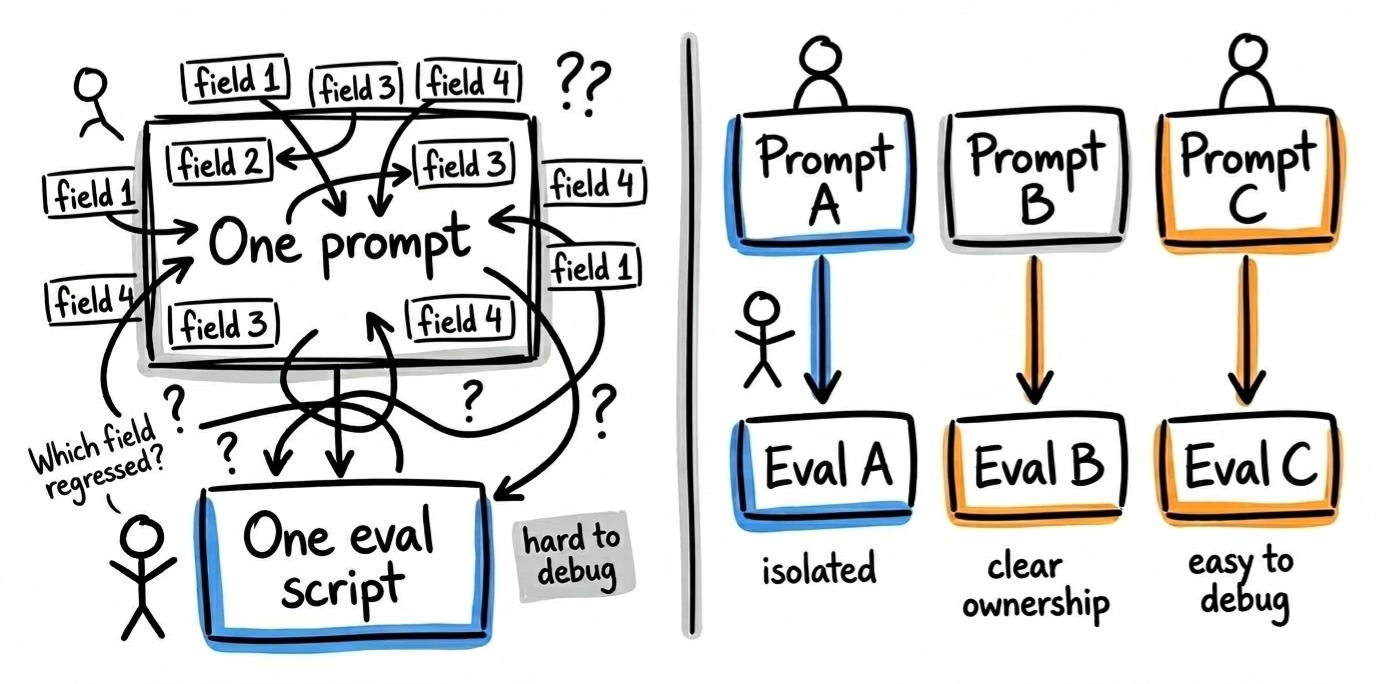
Each prompt gets its own eval directory, its own test dataset, and its own script.
Prompt focus
When one prompt template extracts 11 fields, you can’t isolate which field regressed. You can’t reliably run evals on a prompt you can’t isolate.
Structural requirement: if your prompts aren’t isolated yet, that’s the prerequisite. Without that architectural cleanup, your eval results will be noisy because the prompt is trying to do too much. I show an example of that problem in this blog post.
Avoid smart eval code
Keep each prompt eval in a self-contained script with its own input and output directories.
I’ve seen single eval scripts with complicated conditional logic trying to cover several prompts with different inputs and outputs. The result was higher maintenance overhead in exchange for a misguided application of DRY and a false sense of reusability. Avoid that. Give each eval script a single responsibility.
Multi-step pipeline evals
Isolated per-prompt evals are necessary but not sufficient. You also need integration-level evals that run a document through the full chain and compare final output against expected final output.
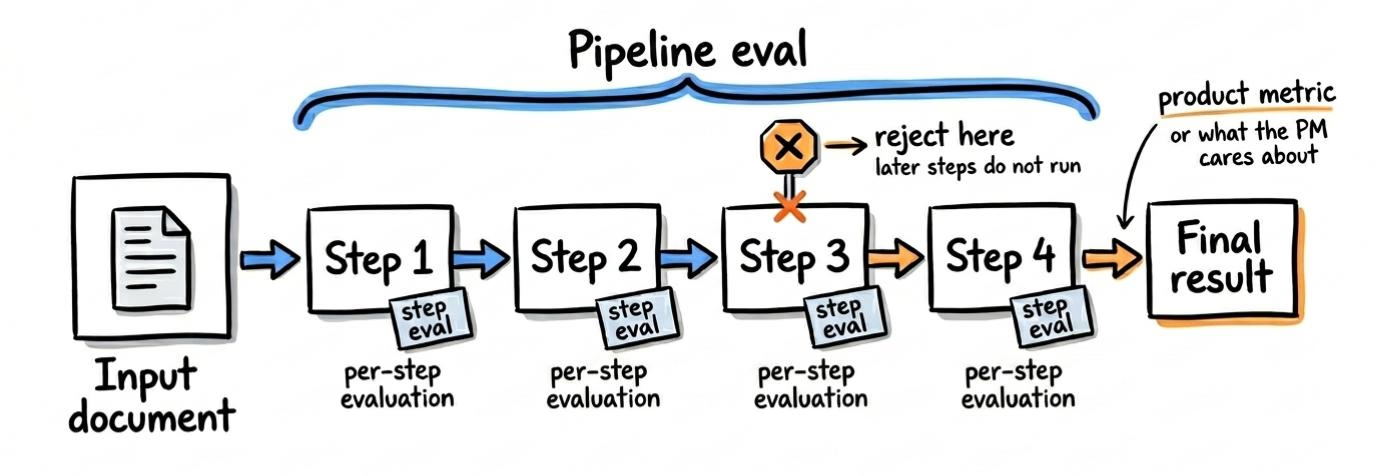
This is harder to set up: more moving parts, longer run times, and harder failure analysis. But it catches a class of errors that per-prompt evals miss: cases where each prompt performs correctly in isolation but the handoff between prompts introduces errors.
Many production pipelines chain prompts. A job classifier I built processes ~1,000 listings a day. The V1 system — a two-prompt chain — had 68% recall. The rebuild used a 6-step LLM chain: a primary classification prompt followed by five sequential exception filters. Recall went from 68% to 95%. API cost did not change — we went from running 2 prompts on every job to running 6 prompts on 25% of them. Errors in step 1 cascaded through steps 2–6.
The chain short-circuits at the first false. If step 2 rejects, steps 3–6 never run. The eval records both the chain’s final prediction and each step’s individual result. That dual visibility surfaces three things per-prompt evals alone can’t:
- Per-prompt accuracy is calculated on different populations. Step 1 sees every job. Step 6 only sees jobs that survived the first five. A 98% accuracy on step 6 means less than it looks when the sample is pre-filtered.
- Step failure distribution tells you where to focus. If 80% of false negatives die at step 3, that’s the prompt to iterate on.
- The chain-level metric is what the product cares about. Per-step accuracy is a debugging tool. The PM wants the chain’s recall: how many qualifying jobs did the pipeline miss?
Start wherever you can get the most useful signal. In some systems that means per-prompt evals first because they are easier to debug. In others, the right starting point is the full pipeline, especially when the product outcome depends more on handoffs than on any single prompt.
Building the test dataset
This is where most teams cut corners. “We tested it on 10 examples and it looked fine.”
Size
10 records is noise. Start with 30 at minimum. For most extraction and classification tasks, 100 is a reasonable baseline. In one project, leadership initially pushed for a 10-record validation set. What changed the conversation was showing that running 200 cases would cost only a few dollars.
Composition
Don’t just sample randomly from production. Balance the dataset across the segments that matter:
- Edge cases vs. normal cases
- Each category or subtype your prompt handles
- Known failure modes from production (if you have HITL correction data, use it)
Ground truth
Store expected values alongside inputs in a format that mirrors the prompt’s output schema. I like including source system IDs so I can trace failures back to the original record during debugging.
For document-heavy tasks (PDFs, contracts), keep the large text content separate from the input metadata JSON and reference the file by path. This makes the test case easier for a human to review and avoids burying the structure in huge text blobs.
Consolidation
If your domain has multi-part inputs (multi-year contracts, threaded conversations), consolidate them into single test cases with nested sub-items. Don’t duplicate shared context across separate cases.
Example: a 3-year commercial lease has year 1, year 2, and year 3 rent figures. You could create three separate test cases — one per year — each carrying the full lease PDF as input. But now you’ve tripled your storage, and if you update the ground truth for that lease, you have to update all three rows. One test case with a nested array of expected values per year is cleaner. The eval script iterates the sub-items internally.
Dataset staleness
The test dataset you built four months ago might no longer represent today’s reality. Production traffic shifts. New document formats appear. Edge cases you didn’t anticipate become common.
Signals that your dataset is stale:
- Human-in-the-loop correction rates are climbing but your eval accuracy hasn’t changed
- New categories or subtypes have appeared in production that aren’t in the test set
- The distribution of your test set no longer matches production (you built 50/50 edge cases; production is 95/5)
Practical fix: define a dataset refresh cadence. Quarterly is reasonable for most teams. Pull in recent human corrections and recent production inputs. Add new failure modes. Remove cases that no longer represent real traffic.
The eval is only as good as the dataset. If the dataset is frozen, the eval is measuring your prompt against yesterday’s problems.
Ground truth disagreements
You might assume ground truth is unambiguous. In practice, domain experts disagree.
When this happens, you need a tiebreaker process not a coin flip. Options:
- Majority vote across 3+ annotators
- Escalation to a domain lead whose decision is final
- Accepting the ambiguity and marking the case as “contested” in the dataset (excluded from accuracy calculations but tracked separately)
If you skip this, your eval accuracy number includes noise from labeling disagreements, not just model errors. You’ll end up chasing prompt improvements for cases where the ground truth itself is debatable.
Versioning: know what you’re comparing
Two runs are only comparable if they used the same input data. Generate a SHA hash of all input files, store it with the dataset, and validate it before each run.
If the hash changed, you’re comparing against a different dataset. Flag it. Don’t mix results.
In some cases, you can commit the test data to version control. Dataset changes should be visible in git history the same way code changes are.
Include the input hash, model, and prompt ID in every result file. Those three values define whether two runs are apples-to-apples.
Running evals
A few operational details matter once you start running evals regularly.
Unique run IDs
Generate a timestamp-based run ID at the start. Every output file for that run should use it. This prevents overwriting and makes historical comparison possible.
Subset runs for debugging
Support running a subset of test cases by index or limit. When you’re iterating on a prompt, you don’t want to burn through 200 API calls every time. Run 10, inspect the pattern, then run the full set.
Error handling
Track pass/fail per test case, not just the overall score. A 90% accuracy number is useless if you can’t see which 10% failed.
Retry transient API failures (timeouts, rate limits) with configurable attempts. But fail fast on unrecoverable errors (auth failures, budget exhaustion, 412s). Don’t waste API calls retrying something that will not succeed.
Your eval API key should be rate-limited so a bug doesn’t burn through more budget than expected.
Observability
Generate a trace ID per run and pass it to your LLM provider or AI gateway. You want to be able to find the exact API calls from a specific eval run in Portkey, Datadog, or whatever you use.
Include per-test-case metadata (eval run ID, test case index) in API calls so you can filter logs by individual item.
Latency and cost as eval dimensions
Accuracy is the core metric, but it is not the only one that matters. A prompt that is 95% accurate at $0.12 per call is a different proposition from one that is 95% accurate at $0.03 per call.
Track per run:
- Total cost
- Average cost per test case
- Average latency per call
Track cost and latency trends over time for each prompt version. If you split an uber prompt into 6 individual calls, accuracy might improve but cost goes up 4x. That’s a product decision, not just an engineering one.
Include these in the result card. They matter as much as the accuracy number when deciding whether to ship a prompt change.
Output structure
When your eval runs, it should persist an output artifact.
For example, here’s what that can look like on disk for a single prompt eval:
eval_numeric-field/
├── eval.py                        # Self-contained eval script
├── mock_server.py                 # Mock API for local testing
├── test_eval.py                   # Tests for the eval infra itself
├── input/
│   ├── records.json               # Test dataset with expected values
│   ├── input.sha256               # Hash for versioning (e.g. 0e3c2b216780)
│   └── documents/                 # Large text inputs stored separately
│       ├── doc_001.txt
│       ├── doc_002.txt
│       └── ...                    # 100 source files
└── output/
    ├── 20251218_175235/           # Each run gets a timestamped directory
    │   ├── summary.txt            # Result card (the 30-second read)
    │   ├── 20251218_175235_results.json  # Per-item expected vs. actual detail
    │   ├── requests/              # Raw API request logs
    │   │   └── case_001_request.json
    │   └── responses/             # Raw API response logs
    │       └── case_001_response.json
    └── 20251219_150902/           # Next run — never overwrites
        ├── summary.txt
        ├── 20251219_150902_results.json
        ├── requests/
        └── responses/
Tiered output
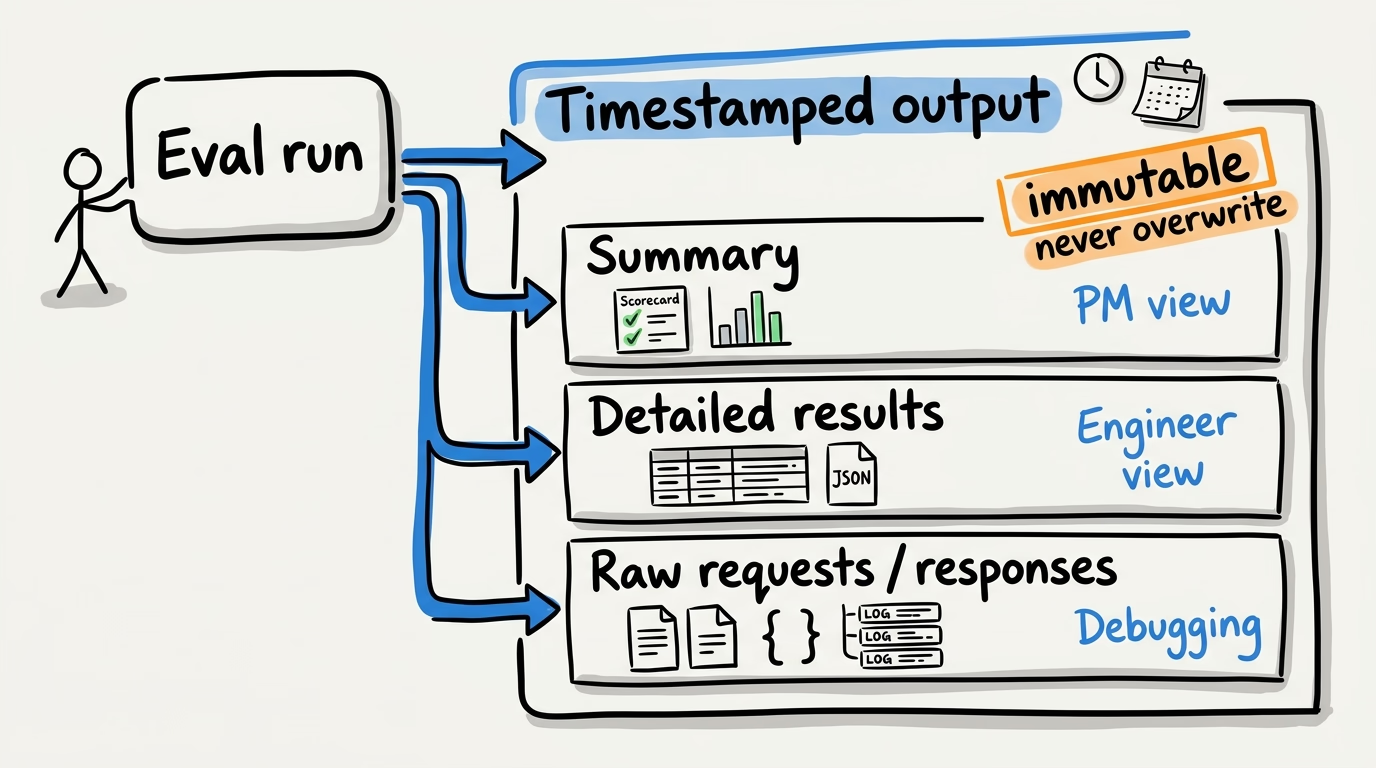
Write three levels of detail to a timestamped directory:
- Summary: timestamp, trace ID, input hash, model, prompt ID, total count, accuracy by category. This is the result card. A PM should be able to read this in 30 seconds.
- Detailed results: per-item predictions, expected values, match status, error messages. This is what an engineer uses to debug.
- Raw data: full API requests and responses. Truncate very large inputs to keep logs manageable, but preserve the debugging signal.
Here’s an example of that summary file:
Test time: 20251219_150902
Prompt ID: pp-numeric-field-6dc361
Trace ID: eval-pp-numeric-field-6dc361-20251219_150902
Input SHA: 0e3c2b216780
Model: gpt-4o

Number of documents: 100
Number of extracted values: 112

Document-level Accuracy: 98.00%
Value-level Accuracy: 98.21%

Accuracy by Document Type (document-level):
  Type A (57 documents): 96.49%
  Type B (33 documents): 100.00%
  Type C (10 documents): 100.00%
Immutability
Never overwrite. Each run creates a new timestamped directory. If you need to rerun with the same parameters, create a new directory anyway. Historical results should always be available for comparison.
Upstream dependency testing
Evals test whether the extraction prompt correctly pulled values from the input text. They do not test whether the input text itself was correct.
If your pipeline has upstream steps such as OCR, document parsing, data enrichment, or embedding generation, your eval is testing one link in a chain. A perfect eval score does not mean the end-to-end pipeline is correct.
Options:
- Accept it. Document the assumption (“evals assume OCR output is ground truth”) and move on. This is what we did on a contract pipeline I worked on.
- Add an end-to-end eval layer that compares pipeline output against source documents rather than intermediate representations. This is expensive to build and maintain.
- Spot-check upstream quality separately. Run OCR accuracy checks on a sample of documents and track the error rate independently.
The point is not that every team needs end-to-end evals. The point is that you should know where your eval boundary is and what it does not cover.
Human baseline comparison
An eval tells you the prompt is 85% accurate. Is that good? It is hard to answer without knowing how accurate a human would be on the same task. If humans get 82% on the same test set, 85% from the LLM is a win. If humans get 97%, you still have a gap to close.
Run the test dataset past a human reviewer, or use historical HITL data as a proxy. Establish the human accuracy baseline. Report both numbers side by side. “The model is at 88% and humans are at 91%” is a more useful conversation than “the model is at 88%” when you’re defining your performance thresholds with stakeholders.
When to stop iterating
Prompt tuning has diminishing returns. Going from 70% to 85% might take a day. Going from 85% to 90% might take a week. Going from 90% to 93% might take a month and a model upgrade.
Before you start iterating, define the target. The conversation about acceptable failure rates belongs to the PM and business stakeholders, not the engineer alone.
Once you hit the target, ship. Don’t gold-plate.
If you can’t hit the target after reasonable effort, that is a signal too. Maybe the task is not suited to the current model. Maybe you need a different approach: deterministic fallback, ensemble logic, or human in the loop routing. The rent roll uploader was exactly this — we stopped trying to make the LLM do a calculator’s job.
Local testing with mock servers
Catch bugs in your eval script before burning API credits. Treat your eval harness like production code.
Use an AI gateway mock API server that returns ground-truth values from the test dataset. That lets you verify output parsing, JSON handling, metric calculations, and error-handling paths without calling the real provider.
Support simulated failures too: timeouts, malformed JSON, auth failures, and non-200 responses. Your eval script should be tested against bad responses, not just valid ones.
Add a --mock flag to the eval script that switches the endpoint to localhost without requiring credentials.
Final thoughts
Evals are a prerequisite for shipping LLM features responsibly. When you inherit a system without them, one of the first priorities should be backfilling them. Without evals, you are operating blind.
Adding evals requires engineering and product to work from the same definition of success. Engineering builds the infrastructure; product helps define acceptable failure rates, high-cost mistakes, and the edge cases worth tracking. Without that shared framing, evals can become well-engineered systems that answer the wrong product question.